Overview
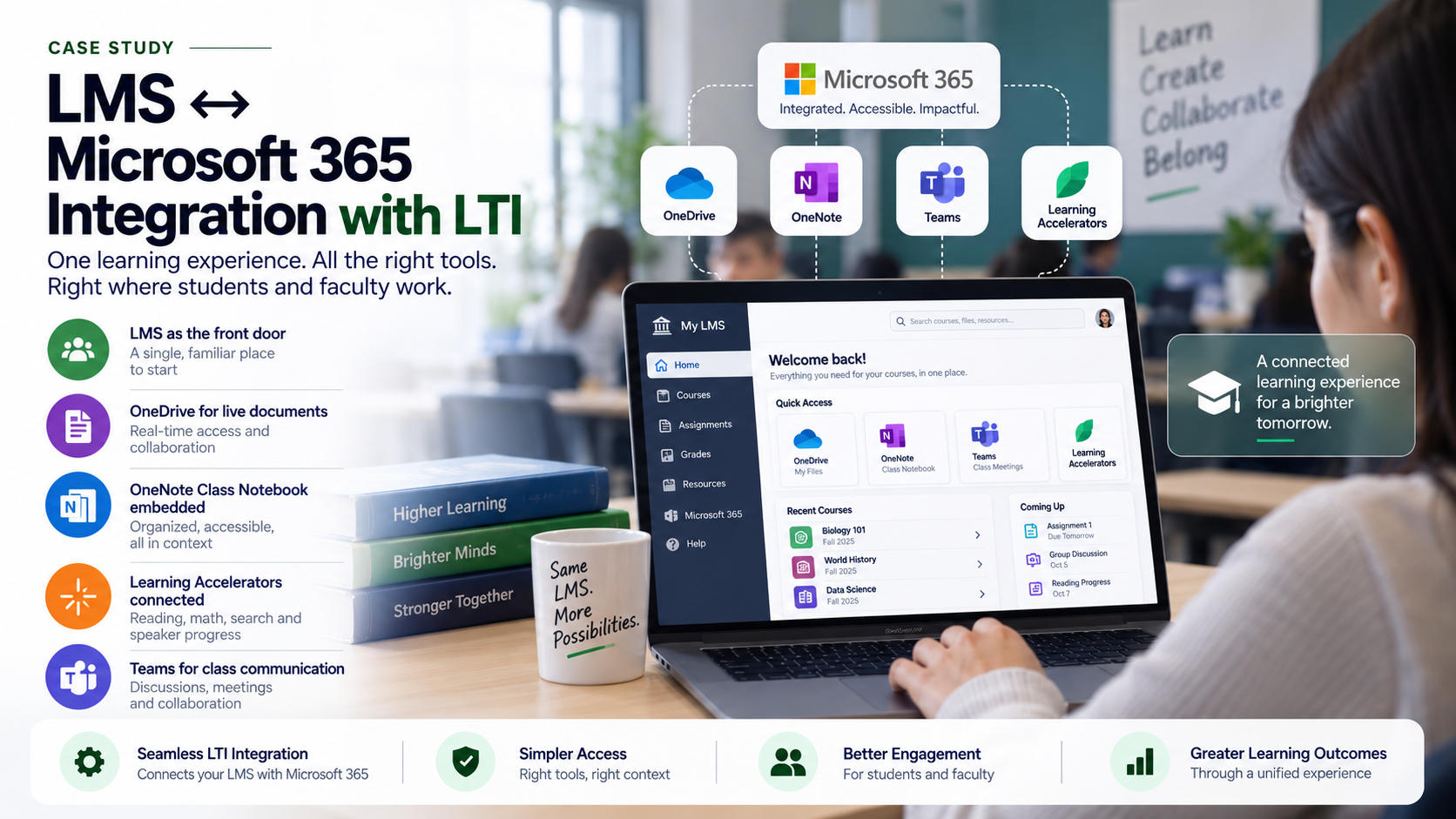
A school was using a learning management system and Microsoft 365, but the two environments were not working together cleanly. Faculty were posting files in the LMS, storing documents in OneDrive, using Teams for meetings, creating assignments in different places, and manually updating grades. Students had to jump between systems and often submitted work in the wrong location. MSPowerhouse implemented a Microsoft 365 LTI-based integration model to connect the school's LMS with Microsoft 365 tools. Before Implementation Before the project, the school had a fragmented digital learning experience. Faculty uploaded duplicate files into the LMS. Students downloaded outdated Word or PowerPoint files instead of working from live cloud documents. Some instructors used Teams Assignments, others used LMS assignments, and others used email. OneNote Class Notebook was underused because it was not embedded into the course workflow. Grades and feedback required manual effort. Students complained that they did not know where to go. Faculty complained that Microsoft tools were powerful but disconnected from the LMS. IT was concerned about old LTI tools, inconsistent access, and support tickets caused by confusion. What We Implemented MSPowerhouse implemented Microsoft 365 LTI integration and redesigned the school's digital course workflow. The implementation included: LMS integration with Microsoft 365 LTI. OneDrive and Microsoft 365 file access inside course workflows. OneNote Class Notebook integration. Teams Assignments integration. Learning Accelerators availability inside assignments. Assignment and feedback workflow design. Grade sync planning. Faculty training by department. Course template guidance. Cleanup of outdated LMS/Microsoft links. Student orientation guide for where to access files, assignments, notebooks, and feedback. Challenge During the Project The main challenge was faculty inconsistency. Some faculty wanted everything inside the LMS, while others preferred Teams. Students were caught in the middle. MSPowerhouse solved this by creating a standard course technology pattern: LMS remains the front door. Microsoft 365 powers files, collaboration, assignments, notebooks, and feedback. Teams supports class communication where appropriate. OneDrive stores live documents instead of static uploads. Learning Accelerators are used for targeted student practice. This gave faculty flexibility while giving students consistency. After Implementation After implementation, students could access Microsoft 365 learning tools through the LMS instead of navigating disconnected systems. Faculty could attach live Microsoft 365 files, use OneNote Class Notebook, create assignments, and use Learning Accelerators without forcing students into a separate workflow. The school reduced confusion, improved course consistency, and created a stronger foundation for digital learning.
Challenge
- Faculty used inconsistent mixes of LMS, Teams, and email.
- Students worked from outdated downloaded files instead of live cloud docs.
- OneNote Class Notebook was underused because it wasn't embedded into the course.
Solution
Standardized course technology: LMS as front door, M365 for files/collaboration/assignments. Embedded OneDrive for live documents and OneNote Class Notebook into courses. Wired in Microsoft Learning Accelerators for targeted student practice. Defined Teams use where appropriate for class communication.
Technical Execution
- Standardized course technology: LMS as front door, M365 for files/collaboration/assignments.
- Embedded OneDrive for live documents and OneNote Class Notebook into courses.
- Wired in Microsoft Learning Accelerators for targeted student practice.
- Defined Teams use where appropriate for class communication.
Outcome
The school gained: Cleaner LMS and Microsoft 365 integration. Less duplicate file management. Better student access to course materials. Easier assignment workflows. More consistent use of OneNote and OneDrive. Improved faculty adoption of Microsoft education tools. A clearer path for Learning Accelerators and AI-supported feedback. Why This Matters for Schools Most schools already own powerful Microsoft tools, but students and teachers suffer when those tools are disconnected from the LMS. MSPowerhouse implemented a connected learning environment where Microsoft 365 becomes part of the course experience instead of another place students have to check.