Most industry analysis covering SharePoint trends in 2026 falls into one of two traps. It either relies on vague consultant clichés ("AI is transforming human connection") or serves as a thinly veiled sales pitch for proprietary third-party governance software. Neither approach helps IT leaders and systems architects solve the real technical challenges unfolding inside enterprise Microsoft 365 environments.
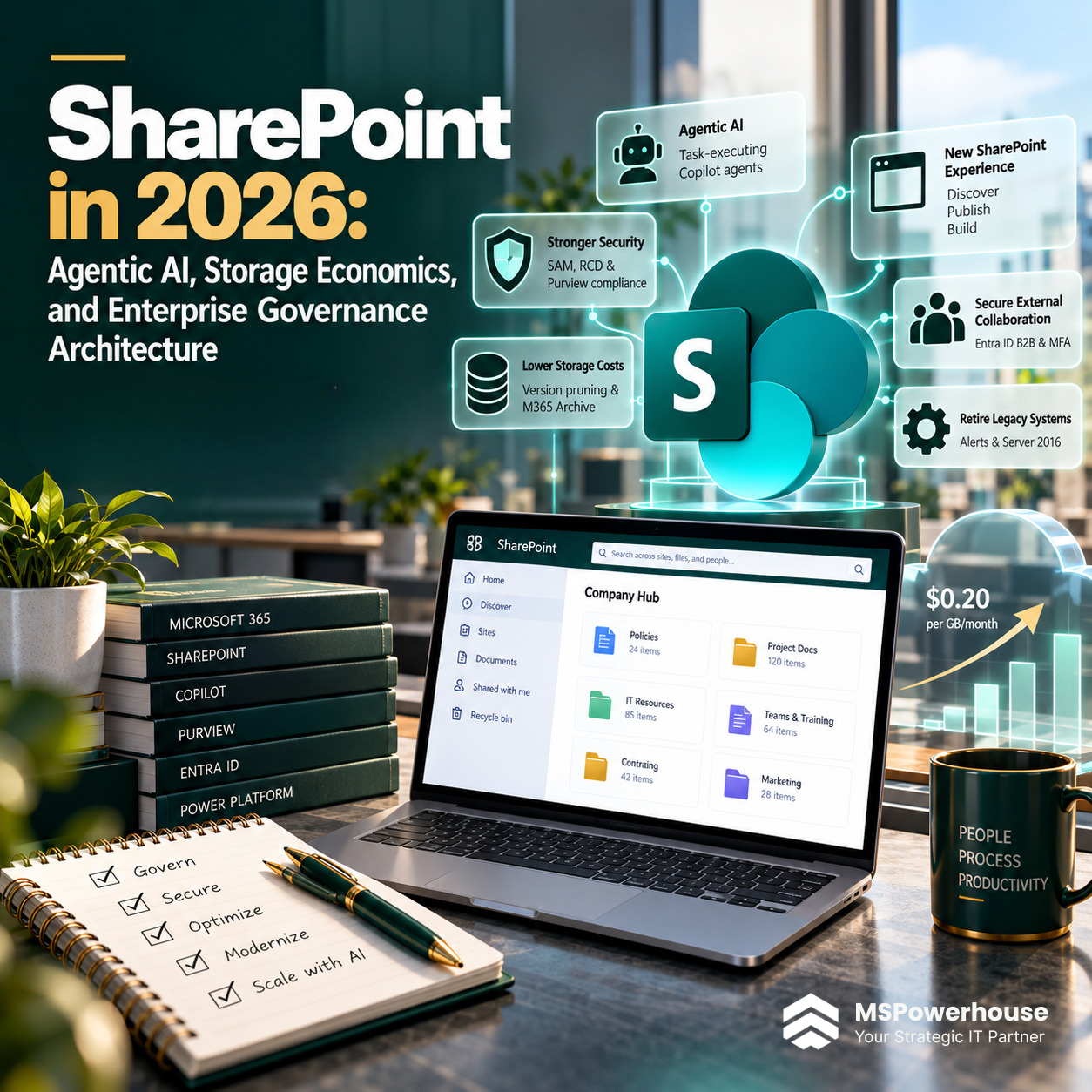
The operational reality of SharePoint in 2026 is governed by hard platform shifts: the emergence of Agentic AI and autonomous Copilot agents, Microsoft's complete overhaul into the New SharePoint Experience (Discover, Publish, Build), aggressive enforcement of $0.20/GB/month storage overages, automated version history pruning, the total retirement of legacy SharePoint Alerts and Server 2016, and the transition from ad-hoc link sharing to mandatory Entra ID B2B guest access.
This technical guide provides the definitive, vendor-neutral architecture blueprint for SharePoint in 2026. Below is a rigorous analysis of the six structural shifts defining the platform, complete with native Microsoft 365 configurations, PowerShell management commands, unit-cost economics, and zero-trust security controls.
In 2026, SharePoint has transitioned from a passive document storage cabinet into the operational grounding layer for enterprise AI agents. Success requires configuring native Microsoft tools - such as SharePoint Advanced Management, Restricted Content Discovery, and Microsoft 365 Archive - to prevent unauthorized AI data exposure and eliminate five-figure cloud storage waste without buying expensive third-party bolt-ons.
The Rise of Agentic AI and Copilot Studio Components
The defining architectural shift of 2026 is the pivot from reactive chat prompts to autonomous agentic workflows. In 2024 and 2025, employees used Microsoft 365 Copilot primarily as an open-ended conversational assistant to summarize emails and draft documents. In 2026, organizations are deploying purpose-built, task-executing AI agents grounded directly on specific SharePoint document libraries.
Using Microsoft Copilot Studio and the modernized SharePoint Copilot Components (formerly Copilot Apps), developers and architects are embedding interactive AI agents directly into departmental workspaces. Rather than returning passive hyperlinks, these agents execute complex multi-step transactions:
- Automated Contract Auditing: An agent grounded on an executed MSA library parses incoming subcontractor proposals, cross-references indemnification clauses against corporate risk policies, and populates approval fields in a SharePoint List.
- Live Connected Dashboards: Modern SharePoint pages feature dynamic Copilot web parts that query live list data and telemetry, generating real-time operational summaries that stay permanently connected to backend data changes.
- Declarative Knowledge Retrieval: Domain-specific agents embedded into Microsoft Teams answer field technician queries with exact citations to verified engineering blueprints while ignoring historical drafts.
This agentic model changes information architecture permanently. If a document library contains redundant, obsolete, or trivial (ROT) data, the AI agent will cite outdated procedures. High-precision taxonomy, Term Store metadata, and active content lifecycles are no longer administrative chores; they are foundational AI engineering requirements.
The Copilot Oversharing Crisis: Zero-Trust Containment via SAM and RCD
Before the arrival of generative AI, loose folder permissions were tolerated because users rarely stumbled upon documents they did not know existed. Document libraries set to "Everyone except external users" or left as "Public" modern team sites created latent security risks, but rarely resulted in immediate exposure.
Microsoft 365 Copilot eliminated security-by-obscurity. Copilot queries execute via Microsoft Graph under the authenticated user's access token. If an employee asks: "What were the executive bonus allocations and planned branch consolidations for Q4?", Copilot crawls every open site collection, summarizes the confidential spreadsheet, and cites the unmanaged SharePoint library directly in the chat.
In 2026, organizations are deploying native Microsoft zero-trust containment controls to eliminate this exposure:
SharePoint Advanced Management (SAM) Oversharing Reports: Running automated Data Access Governance (DAG) reports to identify sites with excessive "Anyone" sharing links, broad organizational links, and open group memberships.
Restricted Content Discovery (RCD): Applying Restricted Content Discovery to high-risk repositories (Legal, HR, Executive, Finance). RCD isolates the site collection from tenant-wide search indexes and Copilot summarization for non-members, even if individual document permissions were historically misconfigured.
Purview Sensitivity Labels with Hardware Encryption: Enforcing automated labeling policies that encrypt files marked "Confidential - Financial," ensuring that unauthenticated AI models and unauthorized tokens cannot decrypt the text stream.
Storage Economics, Version History Pruning, and M365 Archive
Tenant storage has become one of the fastest-growing line items on corporate IT budgets. Microsoft 365 allocates a baseline tenant quota of 1 TB plus 10 GB per licensed user. In unmanaged environments, 65% to 80% of total consumed capacity consists of duplicate document versions, former-employee OneDrive archives, and dead historical project folders.
When pooled storage limits are breached, Microsoft bills standard overages at list price: $0.20 per GB per month ($200 per TB monthly or $2,400 per TB annually). For a mid-market organization with 20 TB of unmanaged version bloat, that equates to $48,000 in unnecessary annual cloud spend.
In 2026, enterprise architects manage this liability using two native engineering mechanisms:
-
Intelligent Versioning and PowerShell Batch Deletion: Microsoft replaced static 500-version caps with Intelligent Versioning (hourly versions retained from 30 to 60 days, daily versions from 60 to 180 days, and weekly versions thereafter). To reclaim gigabytes of storage from existing bloated libraries, administrators run asynchronous batch jobs via the SharePoint Online Management Shell:
New-SPOSiteFileVersionBatchDeleteJob -Identity $siteUrl -Automatic
Operational warningThis command permanently removes superseded versions, bypassing the SharePoint Recycle Bin. Always run preliminary What-If projections prior to queuing deletion batches.
- Microsoft 365 Archive Cold Tiering: Instead of deleting completed project sites or paying commercial overage rates, administrators move inactive site collections into Microsoft 365 Archive. At $0.05 per GB per month, it delivers a 75% cost reduction while keeping files searchable in tenant eDiscovery, fully protected under Microsoft Purview retention, and instantly reactivatable by administrators. (See our technical breakdown on SharePoint Online Storage Quotas and Architecture).
The New SharePoint Experience: Discover, Publish, and Build
Microsoft has executed a comprehensive visual and functional overhaul known as the New SharePoint Experience. Designed to align with Fluent UI design standards and reduce cognitive noise, the platform is now structured around three unified operational pillars:
| Operational Pillar | Functional Role | Key Architecture Changes |
|---|---|---|
| Discover | Intelligent content discovery | Replaces the legacy SharePoint start page with a personalized, AI-curated home feed tracking frequent sites, shared documents, and priority Copilot tasks. |
| Publish | Omnichannel corporate communications | A centralized authoring canvas for corporate news, multimedia video pages, and email distribution campaigns, integrated with the renamed SharePoint App in Teams (formerly Viva Connections). |
| Build | No-code application & agent development | A dedicated development canvas for spinning up governed SharePoint Lists, Document Libraries, automated Power Automate approval chains, and domain-specific Copilot Studio agents. |
In parallel with this refresh, Microsoft has deprecated classic page experiences and blocked custom script injection on modern sites. Organizations still running legacy SharePoint 2013-style script editor web parts must modernize their code into the SharePoint Framework (SPFx).
Critical 2026 Retirements: SharePoint Alerts and Server 2016 EOS
2026 marks a major clearing of legacy technical debt across the Microsoft ecosystem. IT leaders must account for two mandatory platform retirements:
The legacy "Alert Me" feature dating back to SharePoint 2007 has been permanently retired. Organizations must migrate all document and list notification logic to Power Automate Modern Approvals or native SharePoint Rules. Unmanaged legacy alerts will cease firing notifications entirely.
Microsoft has officially terminated all extended security updates for on-premises SharePoint Server 2016 (with SharePoint Server 2019 rapidly approaching its end-of-life). Organizations remaining on on-premises infrastructure face severe cybersecurity compliance penalties under CMMC, HIPAA, and SOC 2, driving a massive wave of migrations to SharePoint Online and SharePoint Subscription Edition. (Review our comparative analysis on SPMT vs. Migration Manager vs. ShareGate).
External Collaboration Moves from OTP Links to Enforced Entra ID B2B
For years, external sharing in SharePoint relied on one-time passcodes (OTP), where an external recipient entered an email code to view a document. While convenient, OTP links created auditing blind spots, lacked conditional access enforcement, and prevented multi-factor authentication (MFA) validation.
In 2026, enterprise governance standardizes on full Microsoft Entra ID B2B Guest Collaboration. When sharing sensitive sites or document libraries with outside legal counsel, audit firms, or subcontractors, organizations enforce:
- Mandatory Entra ID guest authentication with tenant-enforced MFA.
- Automated guest access expiration reviews (e.g., revoking access after 90 days of inactivity).
- Restricting external sharing to approved partner domains via cross-tenant access settings, eliminating anonymous "Anyone with the link" exposures entirely.
Architecture Comparison Matrix: Legacy vs. 3rd-Party vs. Native 2026 Standard
| Operational Capability | Legacy 2020 Model | Proprietary 3rd-Party Stack (e.g., AvePoint) | Native 2026 M365 Enterprise Standard |
|---|---|---|---|
| AI Agent Management | Non-existent; search based strictly on keywords. | Requires proprietary bolt-on agent tracking software. | Native Copilot Studio governance, SAM Data Access reports, and RCD boundary isolation. |
| Storage Cost Control | Unlimited version retention; unmanaged $0.20/GB/mo fees. | Proprietary third-party archiving to external cloud buckets. | Intelligent Versioning trimming + native M365 Archive ($0.05/GB/mo) preserving Purview compliance. |
| External Sharing | Unauthenticated anonymous links or OTP email passcodes. | Requires proprietary guest lifecycle subscription tools. | Native Entra ID B2B guest integration, Conditional Access MFA, and automated access reviews. |
| Site Topology | Deep subsite hierarchies and nested 10-level folders. | Third-party hub restructure modules. | Modern flat hub-and-spoke architecture with centralized M365 Term Store taxonomies. |
| Annual Software Overhead | Low software cost, but massive manual IT ticket overhead. | $25,000 to $80,000+ in recurring third-party software licensing. | $0 additional licensing; fully maximizes existing Microsoft 365 E3/E5 and SAM entitlements. |
5-Step Implementation Roadmap for Enterprise Architects
Conduct a SAM Oversharing Audit: Deploy SharePoint Advanced Management to run tenant-wide Data Access Governance reports, isolating public sites and identifying libraries with broken permission inheritance scopes exceeding 5,000 items.
Quarantine Sensitive Data with Restricted Content Discovery: Shield confidential financial, legal, and HR libraries from broad Copilot queries by applying RCD flags before expanding AI user licenses.
Reclaim Storage via PowerShell Batch Pruning: Run What-If analysis on top storage-consuming sites, schedule New-SPOSiteFileVersionBatchDeleteJob to purge obsolete version history, and tier inactive project sites into Microsoft 365 Archive.
Retire Deprecated SharePoint Alerts and Scripting: Audit existing notification systems and rewrite legacy alerts into Power Automate Modern Approvals executing under dedicated Service Principals.
Flatten Legacy Subsites and Enforce Entra B2B: Modernize on-premises SharePoint Server workloads into flat SharePoint Online site collections linked by Hubs, enforcing Entra B2B guest policies with mandatory MFA.
Modernize Your SharePoint Architecture with MSPowerhouse
Navigating the operational realities of SharePoint in 2026 requires more than basic site configuration. It demands deep architectural engineering across Entra ID security, Microsoft Purview compliance, Power Platform lifecycle management, and cloud storage economics.
Whether you need to secure your data boundaries for Microsoft 365 Copilot, eliminate thousands of dollars in monthly storage overage penalties, or flatten a complex legacy subsite hierarchy, MSPowerhouse provides elite Microsoft systems architects to design and support your environment.