A practical guide to IT support service level agreements, ticket priority tiers, response versus resolution standards, and the critical questions business leaders must ask before signing an IT contract.
When business leaders evaluate managed service providers or audit their internal IT departments, the most common source of frustration is almost never technical competence. It is responsiveness. Employees file tickets only to watch them linger in unmonitored queues, projects stall while waiting for permissions, and executive leadership has no clear way to verify whether their support team is operating efficiently.
Service Level Agreements (SLAs) are designed to solve this exact problem. On paper, an SLA establishes contractual accountability by defining how quickly an IT team must respond to and resolve technical issues. In practice, however, many support contracts rely on marketing loopholes and vanity metrics that look impressive in a sales deck but fail during an actual outage.
Understanding the mechanics of modern helpdesk performance metrics (from First Response Time to Mean Time to Resolution and First Contact Resolution) allows organizations to set realistic operational expectations, protect employee productivity, and ensure critical business systems remain resilient.
1. The SLA Illusion: Why a 15-Minute Response Time Is Often Meaningless
One of the most widespread marketing tactics across the managed services industry is the promise of an ultra-fast initial response time, frequently advertised as under 15 minutes. While this sounds reassuring to a business owner whose staff loses hours to computer glitches, reviewing the contractual fine print often reveals a major caveat: the definition of a response.
In many standard contracts, an initial response is triggered the second an automated ticketing system generates an acknowledgment email stating that your request has been logged. No engineer has opened the ticket, no diagnostics have begun, and the business impact remains unaddressed. Yet, from a contractual perspective, the provider's SLA timer stops running.
According to technical support industry benchmarks tracked by HDI Support Benchmarks and KPIs, high-performing service desks evaluate their performance based on human engagement rather than automated receipts. A genuine service level agreement must differentiate clearly between automated acknowledgments, first human engineer contact, and substantive diagnostic progress.
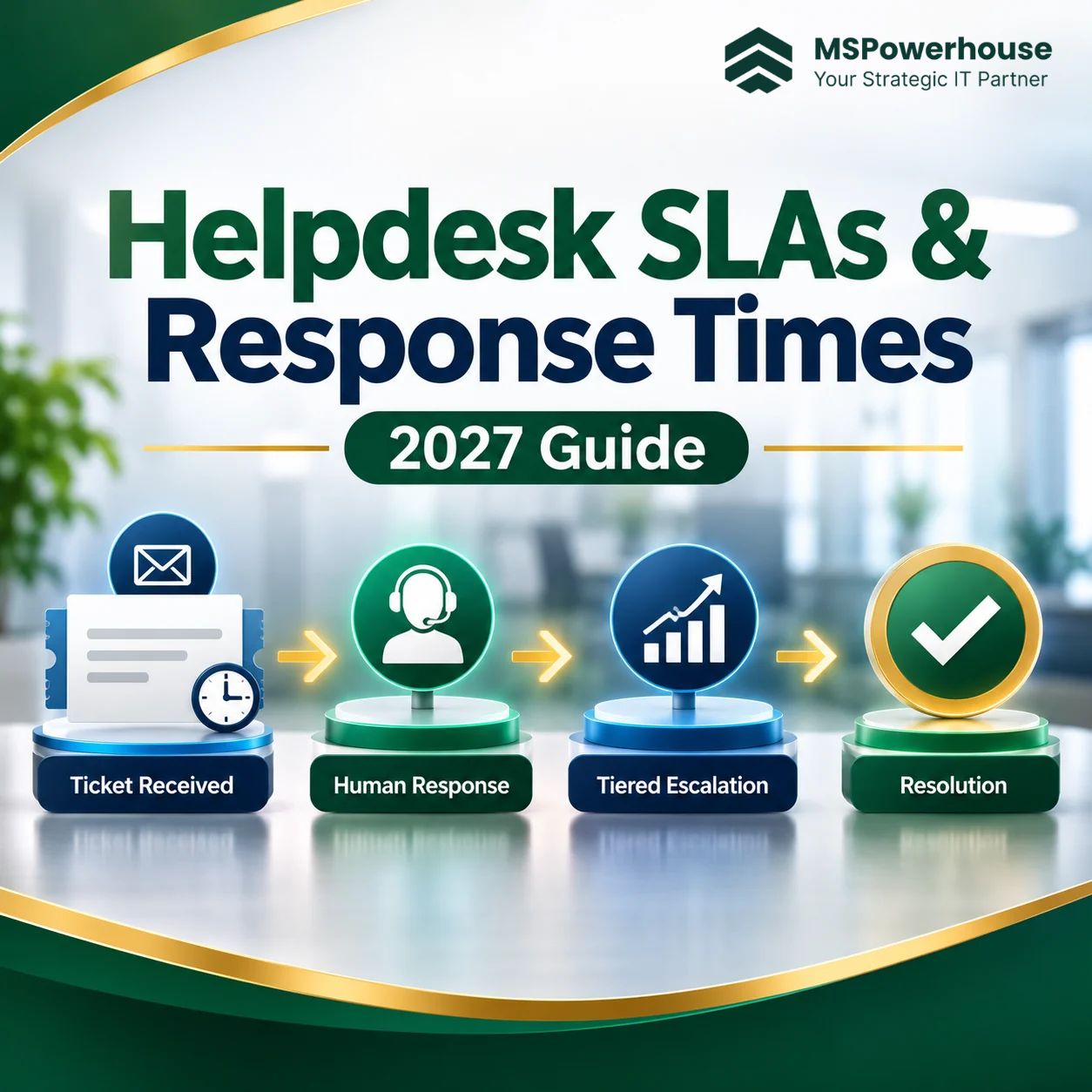
Figure 1. The ticket lifecycle, distinguishing automated receipt generation from active engineer investigation and final incident resolution.
When negotiating support contracts, organizations should insist that the First Response Time clock remains active until a qualified Tier 1 or Tier 2 technician actively reviews the ticket, categorizes the business urgency, and begins active troubleshooting.
2. The 2027 Helpdesk Severity Matrix: Prioritizing by True Business Impact
Treating every technical request with identical urgency inevitably leads to operational chaos. If a technician prioritizes an executive's monitor adjustment over a firewall degradation affecting fifty customer service representatives, both operational productivity and service quality suffer.
To balance workloads effectively, professional IT operations follow standardized incident categorization frameworks, such as those published in the NIST Computer Security Incident Handling Guide (SP 800-61). Incident classification evaluates two distinct axes: organizational impact (how many employees or revenue-generating services are impaired) and technical urgency (how rapidly the problem will escalate if left untreated).
Modern IT service delivery divides requests into four distinct priority tiers, each governed by its own response and resolution commitments:
Priority 1 (Critical Outage): A complete disruption of primary business services. Examples include core network switch failure, enterprise email outage, ransomware detection, or core database corruption. There is no acceptable workaround, and business operations are halted.
Priority 2 (High Impact): A major departmental function or critical application is severely degraded, but a temporary workaround exists. Examples include an entire accounting team unable to access payroll software, or intermittent VoIP phone dropouts across a sales floor.
Priority 3 (Medium / Standard Request): An individual user's primary workstation or software is malfunctioning, but company-wide operations continue uninterrupted. Examples include a single malfunctioning laptop, local printer connectivity loss, or individual mailbox sync errors.
Priority 4 (Low / Informational): General administrative tasks, routine inquiries, or non-urgent changes. Examples include software license allocation requests, hardware upgrade inquiries, or password reset walkthroughs.
Figure 2. Standardized IT support severity tiers, illustrating expected human response windows and target resolution timeframes.
Table 1. Helpdesk Priority Matrix, Response Commitments, and Target Resolution Benchmarks
Priority Level | Scope of Impact | Target Response | Target Resolution | Escalation Threshold |
P1 - Critical | Enterprise-wide outage; total halt of key operations | < 15 minutes | < 2 to 4 hours | Immediate Tier 3 dispatch |
P2 - High | Major business unit impaired; workaround available | < 30 to 60 mins | < 4 to 8 hours | 30 mins without progress |
P3 - Medium | Single user blocked; normal business unaffected | < 2 to 4 hours | < 12 to 24 hours | 2 hours without progress |
P4 - Low | General requests, minor bugs, planned changes | < 4 to 8 hours | 2 to 3 business days | End of business day review |
3. Key Metrics: Response Time vs. Resolution Time vs. First Contact Resolution
Focusing exclusively on response times incentivizes counterproductive behavior. When helpdesk technicians are evaluated solely on how quickly they respond, they may rush to acknowledge tickets or offer rapid, generic replies that fail to fix the underlying problem.
To gain a comprehensive view of IT operational health, service desk managers utilize established service management standards, such as the ITIL Service Management Framework. Three core operational metrics should be tracked in conjunction:
First Response Time (FRT): The duration between when a user submits a support ticket and when a technician begins active diagnosis. In professional IT environments, average business-hours FRT across all ticket severities ranges between 15 and 45 minutes.
Mean Time to Resolution (MTTR): The total elapsed time from ticket submission to verified problem resolution. For Priority 3 tickets (which represent roughly 70% of helpdesk volume), top-quartile IT service providers achieve an average MTTR between 4 and 8 business hours.
First Contact Resolution (FCR): The percentage of tickets resolved during the very first interaction with the user, without requiring reassignment or follow-up calls. Industry benchmarks identify an FCR between 65% and 75% as the hallmark of an efficient, well-trained front-line support staff.
When First Contact Resolution is high, employee satisfaction increases dramatically, and the total cost per ticket decreases. Conversely, an FCR below 50% indicates that front-line technicians lack the permissions, diagnostic tools, or training required to solve routine issues, creating a bottleneck for senior engineers.
4. Cloud Service SLAs vs. Helpdesk SLAs: Clarifying Operational Boundaries
A common misconception among business leaders is assuming that an IT provider's SLA guarantees 100% uptime for all cloud services. In modern hybrid and cloud-first architectures, IT support operates as a layer on top of underlying hyperscalers like Microsoft Azure, Microsoft 365, or Amazon Web Services.
Major cloud vendors publish their own contractual availability commitments, which are publicly documented in the Azure Well-Architected Framework for Business Metrics and SLAs. For example, Microsoft 365 services maintain a standard 99.9% uptime SLA. If an Exchange Online data center suffers a regional fiber cut, no managed service provider can alter Microsoft's internal restoration timeline.
Organizations can monitor real-time platform availability directly through the Microsoft 365 Service Health Dashboard or interface with vendor engineers via Microsoft 365 Administrative Support Channels.
The true value of a professional helpdesk during an upstream vendor outage lies in rapid triage, contingency execution, and transparent communication. A mature IT support team immediately identifies the vendor origin, notifies affected staff before panic spreads, activates secondary communication channels or backup routing, and continuously updates leadership on recovery milestones.
5. Multi-Tier Support Architecture: Eliminating Ticket Bottlenecks
Tickets frequently sit unresolved for days when an IT provider lacks a structured escalation hierarchy. If an incoming ticket is randomly assigned to whatever technician is available, complex network outages can be assigned to novice helpdesk staff, while senior architects spend valuable hours resetting user passwords.
To maintain velocity, a modern support infrastructure organizes engineering talent into specialized tiers, ensuring tickets flow directly to the appropriate skill level:
Tier 1 (Front-Line Helpdesk): Handles user intake, initial categorization, credential resets, standard Microsoft 365 permissions, software installs, and desktop peripherals. Armed with standard operating procedures, Tier 1 should resolve the majority of daily inbound tickets.
Tier 2 (Systems & Infrastructure Engineers): Manages escalated workstation anomalies, mobile device management (MDM) enrollment errors in Microsoft Intune, hybrid Active Directory sync conflicts, and local networking issues. If Tier 1 cannot resolve an issue within 30 to 45 minutes, it escalates to Tier 2.
Tier 3 (Senior Cloud Architects & Security Specialists): Reserved for complex infrastructure designs, advanced tenant security policies, multi-cloud routing, and critical P1 incident response. Tier 3 engineers also conduct root-cause analysis to eliminate systemic defects.
Figure 3. The three-tier IT support escalation model, demonstrating clear performance targets and seamless escalation pathways.
Beyond resolving individual incidents, high-performing IT teams practice proactive Problem Management. Rather than repeatedly restarting an application server that crashes every Tuesday, engineers analyze diagnostic logs, identify memory leaks or misconfigurations, and implement permanent fixes that permanently reduce ticket volume.
6. Evaluating Support Contracts: 7 Critical Questions for Decision-Makers
Before entering into a long-term managed services agreement, executive leadership should scrutinize the proposed SLA terms. Asking these seven questions will quickly reveal whether a prospective provider offers genuine operational partnership or relies on contract loopholes:
1. How do you define a 'response' in your contract? Ensure the agreement specifies that an SLA clock runs until a qualified technician actively reviews the issue, rather than stopping upon receipt of an automated auto-responder email.
2. What is your historical First Contact Resolution (FCR) rate? Inquire about their verified FCR metrics across similar client environments. A healthy, responsive helpdesk consistently maintains an FCR between 65% and 75%.
3. What are your exact hours of coverage, and what constitutes after-hours emergency support? Confirm whether standard coverage spans 8:00 AM to 6:00 PM local time or covers extended shifts, and verify what billing rates apply to off-hours P1 emergencies.
4. Are your support technicians in-house or outsourced to white-label offshore call centers? Ensure you know who will have administrative access to your sensitive corporate systems. Look for vetted, certified technicians operating under strict confidentiality and security baselines.
5. What financial penalties or service credits occur if SLAs are missed? A service level agreement without consequences is simply an informal goal. Reputable providers offer percentage credits against monthly invoices when contractual SLAs are breached.
6. Do you conduct quarterly business reviews (QBRs) and root-cause analysis? A strategic IT partner reviews historical ticket data every quarter to uncover hardware failure patterns, user training deficiencies, and infrastructure bottlenecks.
7. What are the contract cancellation terms if service levels fall short? Avoid multi-year lock-in contracts that penalize you for leaving if the provider consistently misses its operational commitments. Look for flexible, performance-driven agreements.
Table 2. Managed IT Support Contracts: Common Red Flags vs. Industry Gold Standards
Evaluation Criteria | SLA Red Flags (Warning Signs) | Gold Standard (Best Practices) |
Response Definition | Automated email receipt stops the SLA timer; hours elapse before an engineer touches the ticket. | Clock runs until a certified technician begins triage and active troubleshooting. |
Resolution Commitments | No contractual resolution targets; tickets sit in 'in progress' status indefinitely. | Clear resolution time targets categorized by business severity (P1 to P4). |
Escalation Structure | Flat support pool; difficult tickets are bounced between unspecialized staff. | Formal Tier 1, Tier 2, and Tier 3 escalation pathways with strict time gates. |
Operational Transparency | Clients cannot view open ticket queues or technician notes without requesting manual reports. | Real-time client portal access with full visibility into ticket history and performance data. |
Contractual Flexibility | Mandatory 24 or 36-month locked contracts with severe early termination penalties. | Month-to-month service agreements backed by proven performance and customer retention. |
7. How MSPowerhouse Delivers Transparent, Accountable IT Support
At MSPowerhouse, we believe IT support should be an operational accelerator rather than a daily bottleneck. We engineer our helpdesk and desktop support services around human responsiveness, rapid resolution, and complete transparency.
Rather than hiding behind automated receipts or rigid multi-year contracts, we partner with growing businesses through modern service commitments:
Human-First Response SLAs: Our response clocks measure when a certified technician begins active investigation, ensuring prompt triage when your business needs it most.
Month-to-Month Flexibility: We do not trap clients in multi-year contracts. Our month-to-month service agreements mean we earn your partnership every single month through measurable performance.
Zero Upfront Onboarding Fees: We invest in your long-term success from day one, completing comprehensive environment audits, tool deployments, and user onboarding without upfront onboarding surcharges.
Certified In-House Talent: Your tickets are handled by certified Microsoft and cloud systems engineers who understand your infrastructure, security compliance requirements, and business goals.
Proactive Root-Cause Prevention: Through continuous monitoring and weekly ticket trend reviews, our engineers resolve the root causes of recurring glitches before they impact staff productivity.
Whether you are frustrated by slow response times from your current IT provider or looking to establish professional support standards for a growing team, exploring our comprehensive managed IT solutions will help you regain operational momentum.
To benchmark your current IT support responsiveness or review your existing SLA terms, schedule a free consultation with an MSPowerhouse engineer. You can also explore our library of technical resources and guides on the MSPowerhouse Insights Blog.