Copilot Studio lets any licensed maker in your tenant build an agent that reads Graph data, calls external APIs and, since Microsoft added Model Context Protocol (MCP) support, connects to third-party MCP servers that sit outside the tenant boundary. Microsoft also shipped Purview Data Security Posture Management for AI (DSPM for AI) to show what Copilot and custom agents do with your data.
Most tenants have turned on the first and never configured the second. That is how shadow AI gets built inside a compliant tenant.
The problem, in one paragraph
Copilot Studio use is included for Microsoft 365 Copilot users, and since January 2025 Copilot Chat users can run agents on a pay-as-you-go meter billed through Azure. Any maker can build an agent, publish it, and connect it to internal SharePoint sites and external MCP tool servers in a few clicks. No tenant-wide default stops a maker from wiring your customer data into a third-party tool. The controls exist. They are just not on.
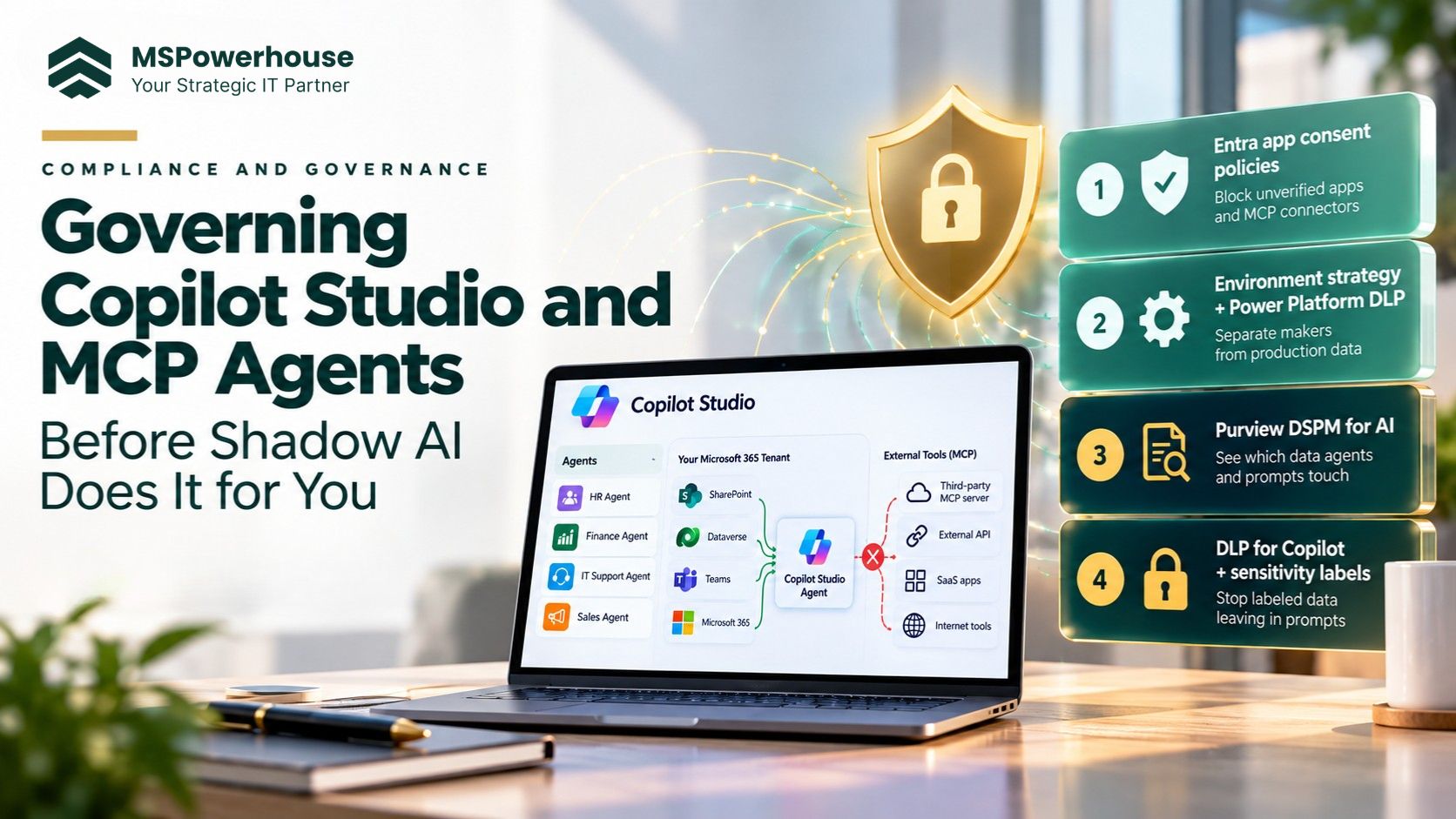
Use a four-layer stack: (1) Entra app consent policies, (2) a Power Platform environment strategy with DLP, (3) Purview DSPM for AI and (4) DLP for Microsoft 365 Copilot with sensitivity labels. Layers 1 and 2 come with licenses you already pay for. Layers 3 and 4 need E5 Compliance or the Purview Suite, which is the honest reason to keep some users on E5.
1 | Entra app consent policies Block unverified OAuth apps and MCP connectors | Included |
2 | Environment strategy + Power Platform DLP Separate makers from production data | Included |
3 | Purview DSPM for AI See which data agents and prompts touch | E5 Compliance |
4 | DLP for Copilot + sensitivity labels Stop labeled data leaving in prompts | E5 Compliance |
Figure 1: Layers 1 and 2 use licenses you already own. Layers 3 and 4 need Purview licensing for targeted users only.
Default tenant vs. governed tenant
| Control | Out of the box | Governed | Licensing | Where |
|---|---|---|---|---|
| User app consent | Users can consent to most apps | Verified publishers, low-risk scopes only; rest goes to admin review | Entra ID (included) | Entra admin center |
| Who can build agents | Every licensed user is a maker in the Default environment | Makers scoped to Sandbox and Dev; Production gated | Included | Power Platform admin center |
| Connector mixing | Any connector can be combined | MCP and external connectors separated from SharePoint and Dataverse | Included | Power Platform data policies |
| AI activity visibility | None | Prompts, agents and sensitive data use reported | E5 Compliance / Purview Suite | Purview DSPM for AI |
| Sensitive data in prompts | Not blocked | Labeled Confidential content excluded from Copilot processing | E5 Compliance / Purview Suite | Purview DLP |
Layer 1: Entra app consent policies (included)
Default Entra tenants let users consent to OAuth apps that ask for delegated access to their mail, files and calendar. That is the same surface an external connector uses. Configure an app consent policy:
Users can consent only to apps from verified publishers, and only for low-risk delegated permissions.
Everything else goes to the admin consent workflow.
Ask for a business justification so people can request real tools instead of finding workarounds.
Layer 2: Environment strategy and DLP (included)
Copilot Studio uses Power Platform environments as its isolation boundary. Every tenant starts with one Default environment, and every licensed user can build in it. That is the pattern to fix.
Create separate Sandbox, Development and Production environments.
Restrict who can create environments and route new makers to a personal developer environment (Microsoft Learn: control environment creation).
Use Power Platform data policies (DLP) to control which connectors can be combined in a single agent.
Turn on Managed Environments for production if you need sharing limits, usage insights and IP firewall rules.
Layer 3: Purview DSPM for AI
DSPM for AI gives you three things you cannot get elsewhere:
Discovery of AI activity across Microsoft 365 Copilot, Copilot Studio agents and third-party AI sites visited from managed devices with the Purview browser extension.
A breakdown of the sensitivity labels on data Copilot and agents use.
Detection of prompts that include sensitive information such as labeled files or personal data.
This needs Microsoft 365 E5 Compliance or the Purview Suite add-on. Assign it to security, legal, finance and executive users rather than the whole company.
Layer 4: DLP for Copilot and sensitivity labels
Sensitivity labels have to exist before DSPM for AI tells you anything useful. If you have never published labels, start there. Then create a DLP policy for the Microsoft 365 Copilot location so content labeled Confidential or Highly Confidential is not used in Copilot responses, and add rules for card numbers and health data.
The MCP-specific rule
An MCP tool server can run anywhere on the internet. That is useful, and it is also the newest way data leaves a tenant. Do not let makers add MCP servers on their own. Enforce two rules:
Every MCP server is reviewed and published as an approved custom connector.
DLP keeps MCP connectors in a different group from SharePoint and Dataverse, so one agent cannot combine them without security approval.
Microsoft 365 tenant
| - - - ✕ BLOCKED | Outside tenant External MCP server Third-party tool |
Figure 2: Without connector separation, one agent can read internal files and send them to an outside tool.
A realistic 3-week rollout
| Week | Work | Outcome |
|---|---|---|
| 1 | Inventory existing agents, apps and connectors; set app consent policy and admin workflow | You know what exists and new risky apps are gated |
| 2 | Build Sandbox, Dev and Production environments; apply DLP data policies; approve MCP servers | Makers can build safely; external tools cannot reach internal data |
| 3 | Publish sensitivity labels, enable DSPM for AI and Copilot DLP for targeted users; hand over a report | Ongoing visibility and a clear owner for AI governance |