Every IT helpdesk vendor pitch in 2026 promises an AI-augmented Tier 1 service desk: an autonomous Copilot, an agentic bot, or a natural language interface that claims to "deflect 70% to 80% of tickets before a human technician ever sees them."
Some of that promise is grounded in real capability. Gartner projects that conversational AI will automate significant contact-center interactions, and Microsoft case studies for Microsoft Copilot for Service demonstrate tangible deflection on password resets and basic how-to queries. However, there is a hard, mathematical ceiling: only 30% to 40% of Tier 1 ticket volume is genuinely automatable at current model reliability without breaking user trust, identity security, or regulatory compliance.
Vendor pitch decks promising 70%+ deflection achieve those numbers through deceptive measurement: they count bot interactions where a user initiated a session, encountered an unhelpful generic response, and abandoned the chat in frustration—marking the ticket as "deflected" even though the user's operational blocker remained completely unresolved.
Ticket deflection is not the primary ROI driver of AI in the service desk. The true economic value is Tier 1 Lift: empowering human technicians with grounded knowledge-base summarization, automated diagnostic triage, and drafted responses to resolve complex tickets faster. That delivers a sustainable, measurable 15% to 25% capacity uplift per shift without introducing security risks.
What the Production Ticket-Mix Data Actually Shows
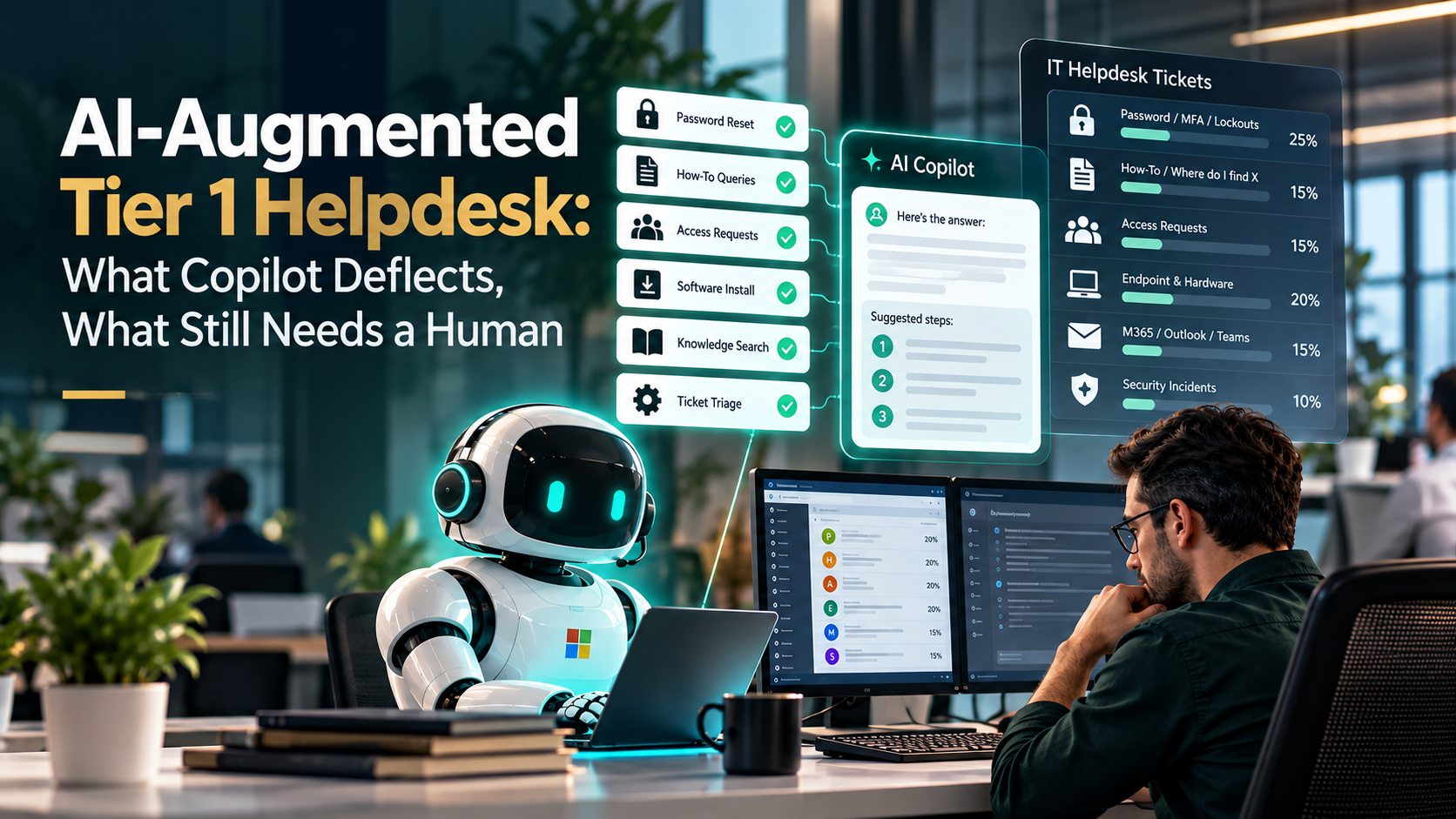
Analyzing incoming ticket telemetry across mid-market enterprise IT environments reveals a highly consistent operational distribution:
| Ticket Category | Share of Volume | Automation Potential | Operational Reality & Constraints |
|---|---|---|---|
| Password / MFA / Lockouts | ~25% | High (Automated) | Automatable via self-service identity portals, but requires strict zero-trust guardrails to prevent account takeovers. |
| How-To / "Where do I find X" | ~15% | High (Automated) | Automatable via AI chat grounded on clean, verified SharePoint knowledge bases. |
| Access Requests (SharePoint, Apps, Distribution Lists) | ~15% | Moderate (Workflow) | Best handled by auditable entitlement workflows (Entra Access Packages), not conversational chat. |
| Endpoint & Hardware Health (No-Boot, Monitors, Printers) | ~20% | Zero (Human Only) | Users describe hardware symptoms inaccurately. AI triage misdiagnoses root causes, creating user frustration. |
| M365 / Outlook / Teams Edge Cases | ~15% | Low (Human Only) | Corrupted local profiles, add-in conflicts, and syncing errors require human diagnostic intuition. |
| Security Incidents & Anomalies | ~10% | Zero (Human Escalation) | Phishing reports, suspicious travel logins, and anomalous data downloads must be triaged by human engineers. |
Adding the only two categories that support safe, end-to-end automation (Password/MFA resets at 25% and basic How-To queries at 15%) yields a realistic deflection cap of 30% to 40%. Attempting to force the remaining 60% into conversational bots erodes employee trust and introduces severe security exposure.
The 6 Helpdesk Intents Worth Automating First
Rather than purchasing complex third-party bot wrappers, high-performing IT teams leverage native Microsoft 365 and Entra ID automation capabilities already included in standard licensing:
Self-Service Password Reset (SSPR)
Deploying Microsoft Entra ID SSPR allows employees to reset expired or forgotten passwords securely using verified authenticator apps or SMS codes. It is included natively with Entra ID P1/P2 and eliminates the single largest category of helpdesk calls before a ticket is ever submitted.
MFA Method Self-Service Registration
Allowing employees to manage, add, and update their own secondary MFA devices through the authenticated Microsoft security info portal (mysignins.microsoft.com), eliminating repetitive helpdesk MFA reset requests.
Governed Group and Resource Access Packages
Rather than forcing technicians to manually add users to SharePoint sites and distribution groups, organizations deploy Entra ID Access Packages. Users request access through a self-service catalog, approvals route automatically to designated resource owners, and access expires after a defined period (e.g., 90 days).
Curated Self-Service Software Deployment
Distributing licensed corporate applications via Microsoft Intune Company Portal. End-users install approved software (Adobe Acrobat, Zoom, Slack) on demand without administrative elevation or helpdesk tickets.
Grounded How-To Knowledge Chat
Deploying Microsoft Copilot Chat grounded exclusively on an authoritative, curated internal SharePoint knowledge base. This allows users to receive immediate answers regarding company expense submission guidelines, holiday schedules, and conference room booking rules with direct source citations.
First-Response Intake Triage & Drafting
Utilizing a Copilot Studio agent to parse incoming email and web tickets, classify issue category and urgency, extract error codes, and generate an AI-drafted response for the human technician to review, edit, and approve before sending.
What NOT to Automate in 2026: The Dangerous Failure Modes
Automating certain workflows introduces catastrophic security, financial, and compliance liabilities:
Identity & Role Elevation
Granting administrative roles, unlocking global admin accounts, or modifying conditional access bypasses must never be delegated to an AI agent. These actions require human verification, Privileged Identity Management (PIM) approvals, and audited break-glass procedures.
License Assignment & Deprovisioning
Assigning or stripping Microsoft 365 E5 or Copilot licenses incurs direct financial costs and triggers destructive downstream events (e.g., removing an Exchange license initiates mailbox deletion routines after 30 days). Workflows can intake the request, but a human must approve the license modification.
Hardware & Physical Endpoint Diagnostics
Non-technical users routinely misdiagnose physical hardware problems (e.g., reporting a dead battery when the physical charging port is bent). AI chatbots attempt to run endless software troubleshooting scripts, frustrating users and delaying hardware swaps.
Regulated Workloads (PHI, PCI, CJIS)
Healthcare and financial compliance frameworks mandate identifiable human accountability for any administrative action touching protected data. Autonomous bots modifying records without human oversight fail regulatory audits.
The SLA Redesign Nobody Does: Moving to a 4-Tier Model
When self-service and AI automation genuinely resolve 30% of incoming volume, traditional helpdesk SLA metrics (e.g., 4-hour first response, 8-hour resolution) break down. IT leaders must transition to a modern 4-tier service architecture:
| Operational Tier | Ownership & Mechanism | First-Response SLA | Target Resolution SLA |
|---|---|---|---|
| Tier 0 | Automated Self-Service & Grounded AI (SSPR, Access Packages, Copilot Chat). | Instant (< 30 seconds) | < 5 minutes (User-driven). Auto-escalates with full chat context if unresolved. |
| Tier 1 | AI-Augmented Human Technicians (Copilot-assisted diagnostic summarization and draft approvals). | < 15 minutes | < 2 hours |
| Tier 1.5 | Senior Technicians handling Identity, Licensing, and Endpoint Swaps (Zero AI in execution loop). | < 30 minutes | < 4 hours |
| Tier 2 & Tier 3 | Senior Cloud & Systems Engineers (Advanced infrastructure, network, and escalations). | < 1 hour | Based on incident severity (Sev 1–3). |
The Regulatory Overlay: HIPAA Security Rule NPRM Compliance
For organizations operating in or adjacent to the healthcare ecosystem, deploying AI in helpdesk operations requires strict adherence to regulatory changes. The Department of Health and Human Services (HHS) Office for Civil Rights published a substantive Notice of Proposed Rulemaking (NPRM) for the HIPAA Security Rule, establishing mandatory controls that directly impact helpdesk workflows:
Multi-factor authentication is mandatory for all workforce members accessing systems containing electronic protected health information (ePHI), including helpdesk personnel.
Strict encryption of ePHI both at rest and in transit across all ticketing platforms and communication channels.
Any AI model or third-party service desk tool processing tickets containing patient data must be covered by a formal BAA. Microsoft Copilot for Service can be configured to operate within Microsoft 365 compliance boundaries, but this configuration is not enabled by default.
Full audit logging is required for every AI action that reads or interacts with ePHI, and automated agents are strictly prohibited from modifying clinical or patient records without human verification.
Build an AI-Augmented Helpdesk with MSPowerhouse
Achieving true helpdesk efficiency requires more than turning on a generic chatbot. It demands an integrated engineering approach: configuring Entra ID SSPR, building secure Access Packages, tuning Intune Company Portal catalogs, deploying Copilot Studio triage agents, and restructuring your support SLAs.
Whether you need to relieve a drowning internal IT team, deploy a fully managed US-based 24/7 helpdesk, or ensure your service desk architecture adheres to strict HIPAA and CMMC compliance standards, MSPowerhouse provides senior systems engineers to design and operate your environment.