Employee onboarding is inherently cross-functional. It spans Human Resources, IT operations, departmental hiring managers, facilities, compliance, and payroll. When organizations rely on disconnected email threads and shared spreadsheets, the handoff process breaks down: hardware arrives late, access privileges linger unapproved, and new hires spend their critical first week locked out of essential systems.
Pairing Microsoft SharePoint with Power Automate Modern Approvals creates a centralized, auditable onboarding engine. Rather than purchasing expensive, disconnected HR point solutions, organizations can leverage their existing Microsoft 365 licensing to orchestrate task tracking, hardware procurement, role-based access approvals, and employee resource delivery.
However, automation does not fix an undefined process. Automating a chaotic onboarding sequence only accelerates operational failure. A sustainable onboarding architecture requires a stable system of record, strict data separation between public policies and sensitive employee PII, resilient exception handling, and enterprise service-account governance.
Successful employee onboarding automation starts with an operational system of record in SharePoint Lists and multi-stage Power Automate logic. Separate general onboarding resources from confidential HR records, decouple critical flows from individual user accounts, and track hard cycle-time metrics to achieve Day-1 readiness for every new hire.
The 4 Architectural Pillars of SharePoint Onboarding
The Centralized Operational System of Record (SharePoint Lists)
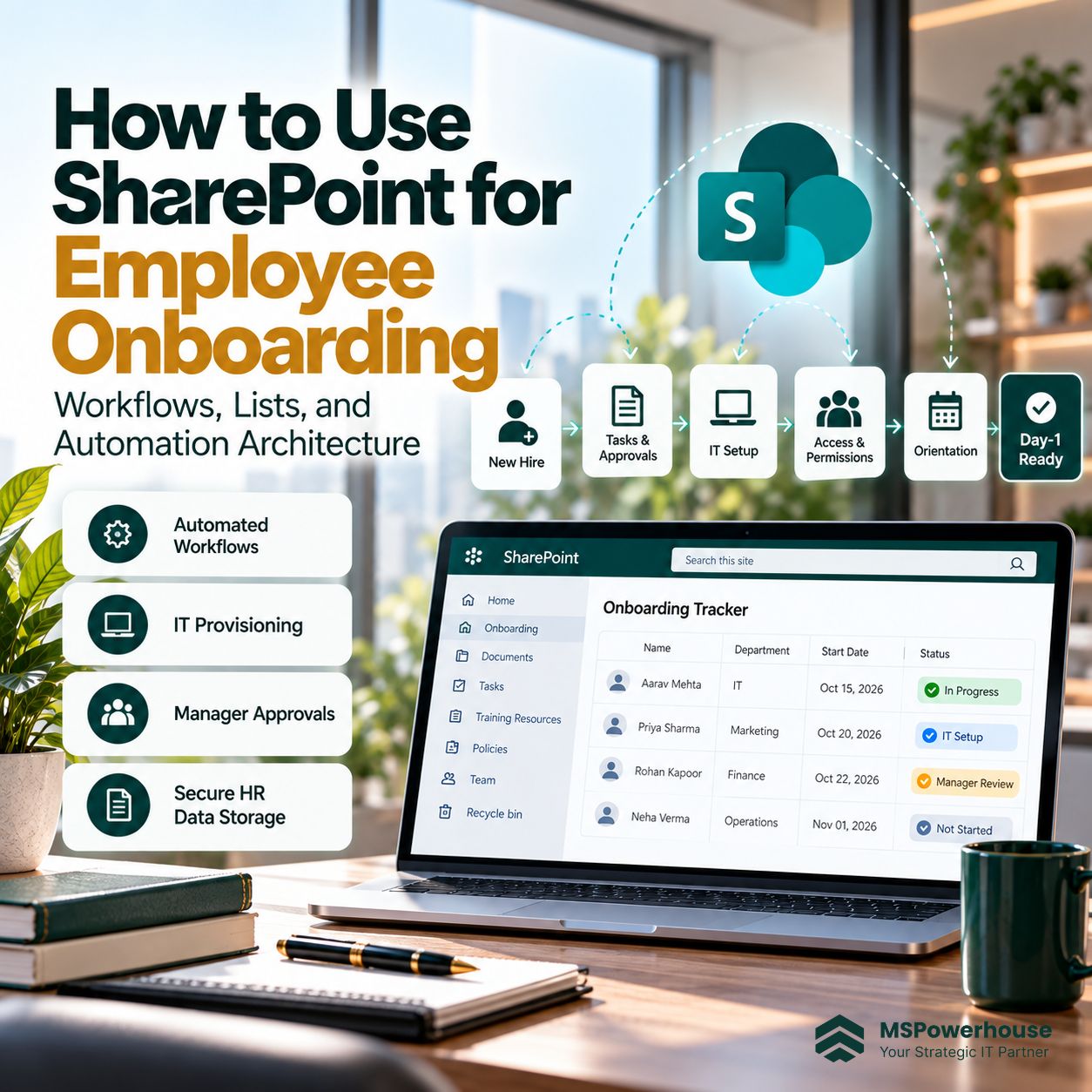
The foundation of the onboarding architecture is a master SharePoint List (e.g., Onboarding Tracker). Unlike a passive spreadsheet, a SharePoint List provides immutable audit trails, role-based column formatting, granular item-level permissions, and real-time triggers for cloud flows. Key tracked schema fields include:
- Candidate & Role Data: Full Name, Personal Email, Position Title, Department, Hiring Manager, Start Date.
- IT & Hardware Fulfillment: Device Type, Serial Number, Delivery Tracking, Microsoft 365 License Type assigned.
- Security & Entra ID Group Mapping: Departmental Security Groups, Distribution Lists, VPN/SaaS access approvals.
- Milestone Status: Background Check Complete, Equipment Shipped, Day-1 Orientation Scheduled, 30-Day Check-in Logged.
Strict Separation: Sensitive HR Records vs. General Onboarding Content
A severe security vulnerability in ad-hoc SharePoint setups is storing employee compensation, Social Security numbers (SSN), and background check PDFs in the same library as company policies. If permissions inherit broadly, any employee with search access can discover restricted payroll data.
Modern SharePoint information architecture mandates a two-tier structural division:
- Confidential HR Document Library: A private, restricted library accessible strictly to HR leadership and payroll administrators, protected with Microsoft Purview Sensitivity Labels and encrypted storage.
- The Employee Welcome Hub (Communication Site): A branded, read-only organizational portal accessible to all incoming hires. It centralizes employee handbooks, health benefits guides, executive welcome videos, and first-week schedules without exposing operational backend data.
Automated Cross-Departmental Task Routing via Power Automate
Manual email handoffs create communication dead ends. Utilizing the SharePoint Online Connector for Power Automate, entering a new candidate into the master list automatically executes parallel workstreams:
- IT Provisioning Branch: Automatically creates an IT service ticket in your helpdesk system to image a laptop, assign an Entra ID license, and ship equipment 10 days before the start date.
- Manager Action Branch: Sends an interactive adaptive card inside Microsoft Teams prompting the manager to assign a peer onboarding buddy and outline Week-1 goals.
- Facilities & Security Branch: Generates automated building access and parking pass requests.
Exception Handling, Reassignment, and Service Account Governance
Most automation projects fail during production because they only account for the "happy path." What happens when a hiring manager goes on PTO for two weeks? What happens when a candidate declines an offer after equipment has shipped? What happens when the HR coordinator who created the Power Automate flow leaves the company?
Production-grade onboarding flows must incorporate timeout escalation rules (e.g., auto-escalating unapproved hardware requests to the Department Head after 48 hours) and must execute under a Service Principal or Dedicated Service Account rather than an individual employee's personal Microsoft account.
Strategic Comparison: Manual Spreadsheets vs. Automated SharePoint Architecture
| Onboarding Capability | Manual Email & Spreadsheet Tracking | Governed SharePoint & Power Automate Hub |
|---|---|---|
| Day-1 Readiness | Frequent delays; hardware unconfigured; licenses missing on morning of Day 1. | 100% automated readiness; hardware dispatched and verified 5 days prior to start date. |
| Data Security & PII | Sensitive I-9 forms and salaries emailed as attachments; high audit risk. | Confidential data isolated in encrypted, role-restricted HR libraries with Purview labels. |
| Task Visibility | Zero cross-functional visibility; managers constantly ping HR for status updates. | Real-time dashboard views displaying progress across IT, Facilities, and HR milestones. |
| Process Reliability | Flows break when key personnel take leave; lost tasks in buried inboxes. | Automated Teams approval cards, timeout reassignments, and centralized service-account ownership. |
| Software Cost | $8 to $20/user/month for third-party HR onboarding point solutions. | $0 additional licensing; fully utilizes existing Microsoft 365 business licenses. |
5-Step Implementation Roadmap for Enterprise Teams
Document Operational Handoffs and Security Boundaries
Before opening Power Automate, diagram the end-to-end onboarding lifecycle across HR, IT, and department leads. Identify required data fields, approval thresholds, SLA deadlines, and exception triggers. Define which records constitute sensitive PII and must be isolated from standard team libraries.
Build the Master Onboarding List and Security Architecture
Create the master Onboarding Tracker list in a dedicated administrative site. Configure custom column metadata, choice fields for departmental tracking, and pre-built view filters (e.g., "Upcoming Starts - Next 14 Days", "Pending IT Hardware"). Enforce broken inheritance at the site level to ensure only authorized personnel can access the master tracker.
Engineer Multi-Stage Approval Flows with Exception Paths
Build the core Power Automate orchestration using Modern Approvals. Incorporate parallel branching so IT hardware dispatch, facilities requests, and manager notifications run concurrently. Add timeout condition blocks (e.g., PT48H) to automatically reassign overdue approvals to an alternate manager or director.
Launch the Branded New Hire Resource Hub
Deploy a mobile-responsive SharePoint Communication Site featuring welcoming leadership video messages, downloadable benefits guides, interactive organizational charts, and step-by-step first-week checklists. Integrate the site directly into Microsoft Teams via Viva Connections so new hires can access onboarding resources on their desktop or mobile device.
Transition Flow Ownership to Service Accounts and Monitor Run Logs
Decouple all Power Automate connections from individual user credentials by reassigning flows to a dedicated Microsoft 365 Service Account or Service Principal. Document standard operating procedures (SOPs) for the helpdesk team and establish weekly run-history reviews to catch failed API calls or connection drops before they affect incoming hires.
4 Common Mistakes When Automating Onboarding
Hardcoding Individual Employee Approvers
Designing flows that send tasks to hardcoded email addresses (e.g., john.smith@company.com) guarantees failure when that individual changes roles, takes vacation, or departs the company. Always route approvals dynamically based on user profile manager hierarchies or centralized Entra ID security groups.
Leaving Flows Tied to Personal User Accounts
When an employee builds a mission-critical onboarding flow under their personal M365 account, disabling their account upon departure immediately disables the flow. Always use service accounts with co-owners.
Dumping Sensitive PII into General SharePoint Lists
Storing SSNs, home addresses, or offer letters in columns visible to general IT technicians or line managers creates compliance violations. Keep PII strictly confined to encrypted HR libraries.
Automating Without SLA Timeouts
A flow that waits indefinitely for an unassigned hiring manager to click "Approve" leaves new hires stranded on Day 1 without credentials. Always build automated 48-hour reminders and managerial escalation paths.
The Operational Scorecard: Measuring Onboarding Success
Validate your onboarding automation using quantifiable operational metrics rather than subjective anecdotes:
| Operational Metric | Target Threshold | What It Measures |
|---|---|---|
| Day-1 Readiness Rate | > 98% of new hires | Percentage of incoming staff with laptop, credentials, and software access fully operational by 9:00 AM Day 1. |
| Average Onboarding Cycle Time | < 5 business days | Total elapsed time from initial candidate entry in SharePoint List to complete multi-departmental provisioning. |
| Manual Touchpoint Reduction | > 70% decrease | Reduction in routine status emails, manual reminder pings, and cross-departmental coordination messages. |
| Day-1 IT Ticket Escalations | < 0.2 tickets per hire | Helpdesk tickets opened for missing passwords, access denials, or missing hardware during Week 1. |
Streamline Your Employee Onboarding with MSPowerhouse
A modern, automated onboarding workflow protects your employer brand, secures your enterprise data, and frees internal HR and IT teams from tedious manual coordination. With proper SharePoint architecture and Power Automate orchestration, your organization can deliver a seamless, Day-1-ready onboarding experience at scale.
Need experienced Microsoft engineers to design your onboarding workflows, configure custom Power Automate approval chains, or audit your SharePoint architecture? MSPowerhouse delivers enterprise-grade Microsoft 365 solutions tailored to your operational requirements.
Explore Our SharePoint Services | Schedule an M365 Architecture Assessment | Enterprise Helpdesk & IT Support