Overview
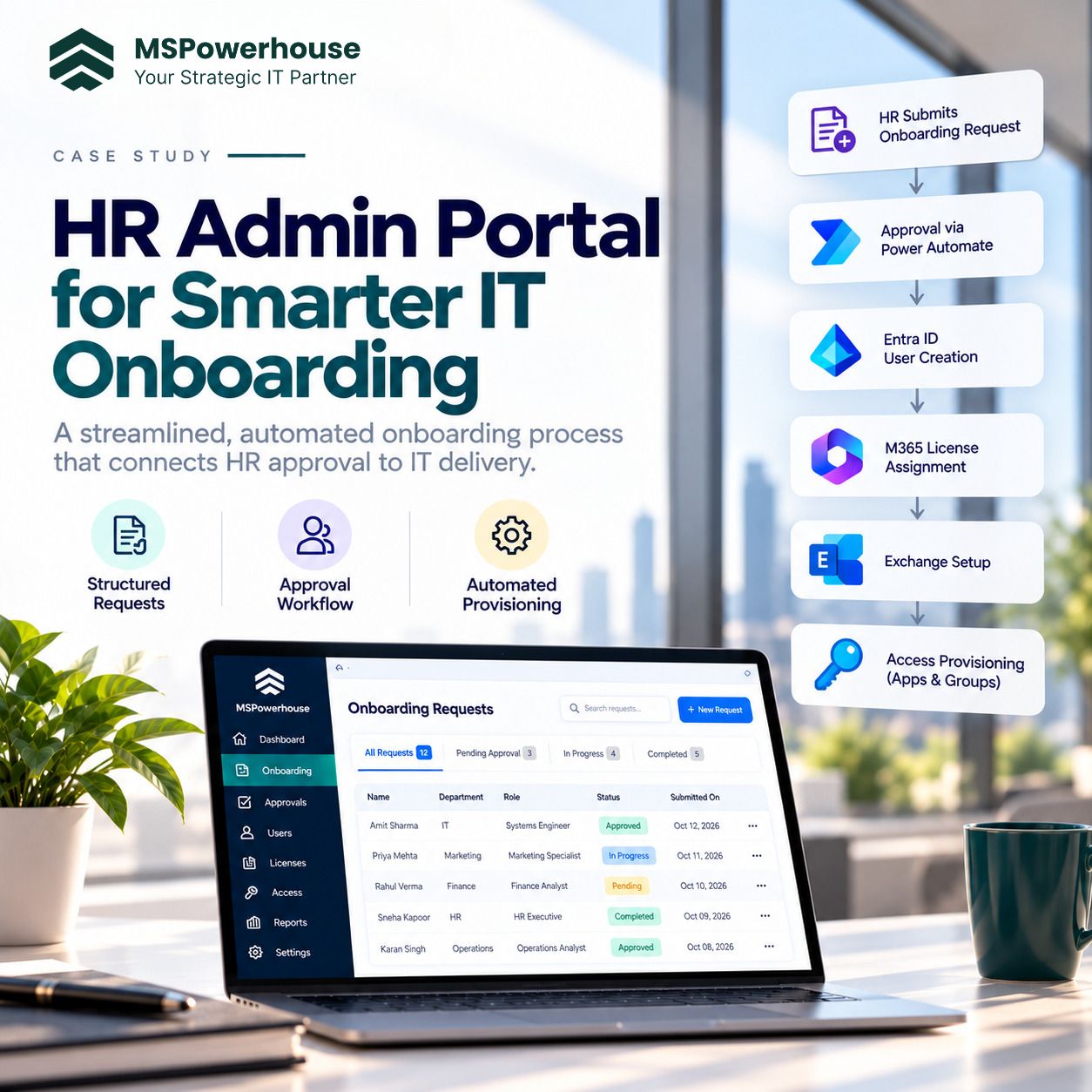
The client needed a structured HR onboarding process that began after a candidate completed background investigation and was approved to move forward. Before automation, user creation, license assignment, mailbox setup, and access provisioning required manual coordination between HR and IT. MSPowerhouse built an HR Admin Portal where HR administrators could submit onboarding requests through a front-end application. Once submitted, the request moved through an approval process and then triggered automated user creation, Microsoft 365 licensing, Exchange configuration, and access setup.
Challenge
- HR requests were submitted through emails or inconsistent formats.
- IT had to chase missing user details.
- Approvals were not always tracked clearly.
- User creation was repetitive and time-consuming.
- License assignment was manual and often defaulted to bundled licenses.
- Mailbox and access setup depended on individual admin steps.
- There was limited visibility into where each onboarding request stood.
- Delays in onboarding affected new hire readiness.
Solution
MSPowerhouse built a custom HR Admin Portal that allowed HR administrators to submit onboarding requests after background investigation was completed. The form captured the information needed for provisioning, including employee details, job information, department, manager, start date, location, license needs, mailbox requirements, and required access.
Once submitted, the request entered an approval workflow. After approval, Power Automate used the submitted metadata to trigger the appropriate downstream actions across Microsoft 365.
The automation created the user in Entra ID, applied the correct Microsoft 365 license based on the licensing model, configured Exchange Online requirements, and assigned required access based on role, department, or submitted request data.
Workflow
The onboarding workflow followed a structured lifecycle:
1. Candidate completes background investigation. 2. HR admin opens the HR Admin Portal. 3. HR admin submits a structured onboarding request. 4. Request is routed for approval. 5. Approval decision is recorded. 6. Approved request triggers user provisioning. 7. User is created in Entra ID. 8. Correct Microsoft 365 license is assigned. 9. Exchange Online mailbox settings are configured. 10. Required access and groups are applied. 11. Request status is updated for HR and IT visibility. 12. Completion is tracked for audit and operational follow-up.
Technical Execution
- Custom front-end HR Admin Portal.
- SharePoint-based request tracking.
- Power Automate approval workflow.
- Entra ID user creation.
- Microsoft 365 license assignment.
- Exchange Online configuration.
- Role- and metadata-based access assignment.
- Request status tracking.
- Notifications to HR, IT, and approvers.
- Error handling for failed provisioning actions.
- Audit trail for onboarding activity.
- License assignment logic tied to job role and business need.
Outcome
The client gained a structured onboarding portal that reduced manual coordination between HR and IT. HR could submit complete requests through one interface, approvals could be tracked, and IT provisioning actions could be triggered automatically after approval. New users could be created faster, with the correct licensing and access from the beginning.
Impact
The project improved onboarding speed, reduced manual IT effort, and helped prevent licensing waste. By connecting the HR approval process to automated Microsoft 365 provisioning, MSPowerhouse gave the client a repeatable and scalable way to onboard users. Why It Matters This was not just a form or a workflow. It was a full HR-to-IT automation process. MSPowerhouse connected the front-end HR experience, approval workflow, identity creation, licensing strategy, Exchange setup, and access provisioning into one controlled lifecycle.